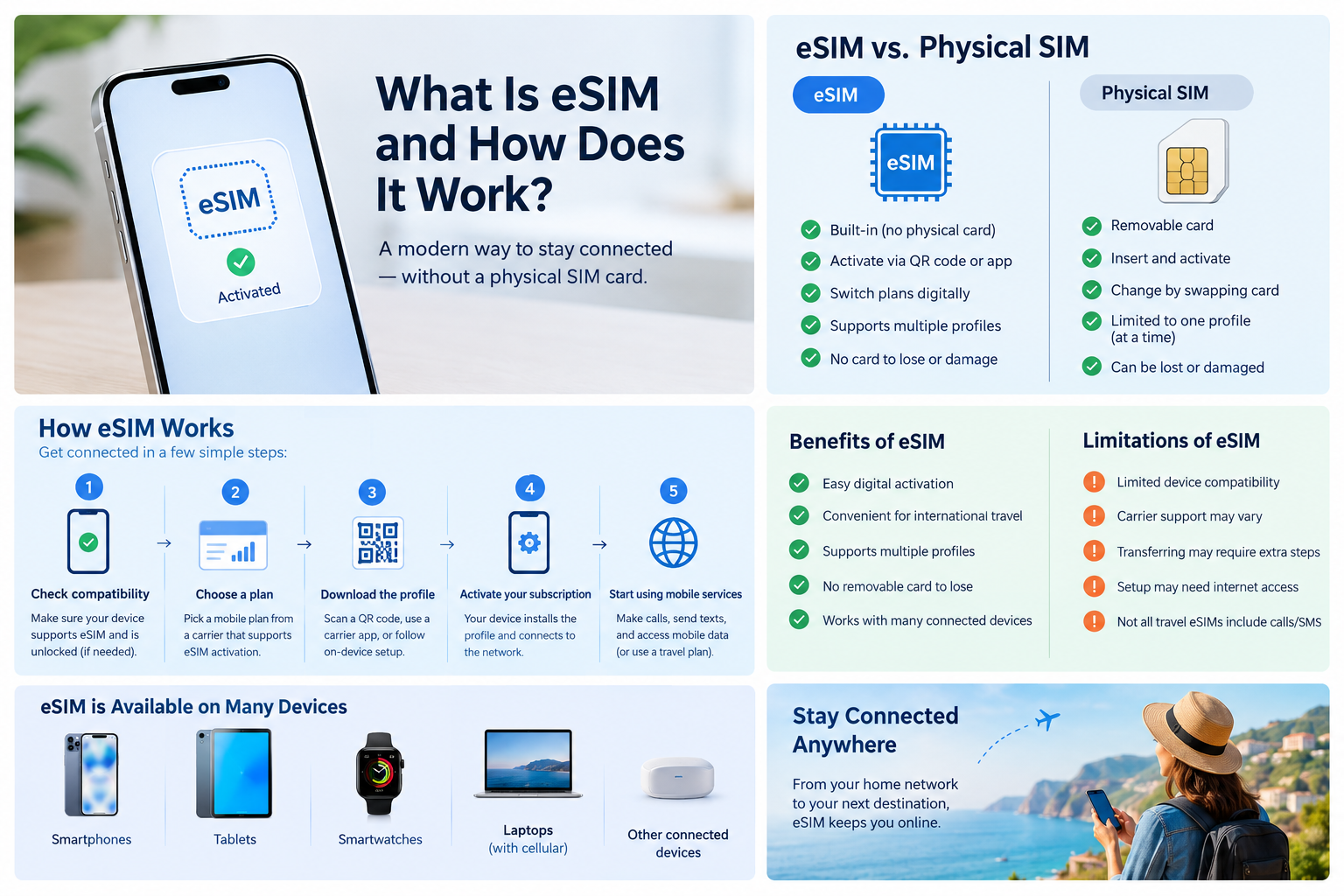
What Is eSIM and How Does It Work? A Complete Guide
Mobile technology is changing the way people connect to cellular networks. One of the most important developments is eSIM technology, which allows users to activate a mobile subscription without inserting a traditional physical SIM card.
But what is an eSIM, how does it work, and is it better than a regular SIM card?
An eSIM makes it possible to download and activate a compatible mobile network profile directly on a supported device. It can simplify switching mobile plans, using multiple numbers, and staying connected while traveling. However, its features depend on your device, mobile carrier, and subscription.
In this guide, you will learn what an eSIM is, how eSIM technology works, its benefits and limitations, and how it compares with a physical SIM card.
What Is an eSIM?
An eSIM (embedded SIM) is a small, built-in component in a compatible device that securely stores a digital SIM profile. The profile contains information and credentials that help identify and authenticate your mobile subscription on a cellular network.
Unlike a traditional SIM card, which you insert into a SIM tray, an eSIM does not need to be physically removed or replaced when you change subscriptions.
Instead, your mobile carrier can provide an eSIM profile that you install on your device. Depending on the carrier, you may activate it by scanning a QR code, using a carrier app, or following an on-device setup process.
eSIM technology is available on many modern smartphones, tablets, smartwatches, and other connected devices.
What Does eSIM Stand For?
eSIM stands for embedded Subscriber Identity Module. The term refers to SIM functionality provided through embedded hardware rather than a removable card.
Although people often call it a digital SIM, an eSIM is not simply a software app. The device contains secure hardware designed to support the storage and management of SIM profiles.
How Does eSIM Work?
An eSIM works in a similar way to a physical SIM card when connecting a device to a cellular network. The main difference is how the SIM profile is delivered and activated.
Here is how the process generally works.
1. Check Your Device Compatibility
First, confirm that your smartphone, tablet, or other device supports eSIM technology. Not every device has an eSIM, and support can vary by model, region, and carrier.
Your device may also need to be unlocked if you want to use an eSIM from a different mobile network provider.
2. Choose an eSIM Plan
Select a mobile plan from a carrier that supports eSIM activation. Depending on the provider, you may choose a regular monthly subscription, a prepaid plan, or a travel eSIM for a specific destination.
Before purchasing, check the plan’s data allowance, validity period, supported countries, and whether it includes calls and SMS or provides data only.
3. Download the eSIM Profile
After purchasing the plan, the carrier provides instructions to install your eSIM profile. This may involve scanning a QR code, using a mobile app, or activating the plan directly through your device settings.
The device downloads the profile and securely stores the necessary subscription information.
4. Activate Your Mobile Subscription
Once the profile is installed, follow the carrier’s activation instructions. Your device may need an internet connection during setup, and some activations may require additional verification.
After activation, the device can use the subscription according to the carrier’s service conditions.
5. Connect to the Cellular Network
Your device searches for a supported cellular network and performs the required authentication process.
If the subscription is active and the network permits access, your device can register on the network and use the services included in your plan.
6. Use Mobile Services
Depending on your eSIM plan, you can use cellular data, make calls, send SMS messages, or access roaming services.
Some travel eSIMs provide mobile data only, so check the plan details before relying on one for calls or text messages.
What Is the Difference Between an eSIM and a Physical SIM?
The main difference between an eSIM and a physical SIM card is their form and activation process. Both can authenticate a mobile subscription and connect a compatible device to a cellular network.
| Feature | eSIM | Physical SIM |
|---|---|---|
| Format | Embedded secure hardware | Removable card |
| Activation | Download or install a profile | Insert a SIM card and activate service |
| Changing plans | Install or switch profiles where supported | Change settings or replace the card |
| Physical SIM tray | Not required for eSIM service | Required for the card |
| Device compatibility | Requires eSIM support | Requires a compatible SIM slot |
| Travel use | Can simplify adding a travel plan | May require buying or swapping a local SIM |
| Physical damage or loss | No removable card to lose | Card can be lost or damaged |
Neither option is automatically better for every user. The right choice depends on your phone, carrier, travel needs, and preferred activation method.
What Are the Benefits of Using an eSIM?
eSIM technology offers several advantages for people who want flexible mobile connectivity.
1. Easy Digital Activation
One major benefit of an eSIM is that you can often activate a mobile plan without visiting a store or waiting for a physical SIM card to arrive.
Many providers offer digital activation, although the exact process varies by carrier and device.
2. Convenient for International Travel
Travelers can use compatible eSIM plans to access mobile data in other countries without necessarily removing their primary physical SIM.
For example, you may keep your regular number available for supported services while using a travel eSIM for internet access. Your phone must support the required SIM configuration, and roaming charges may still apply to your primary line.
3. Support for Multiple SIM Profiles
Some eSIM-compatible devices can store multiple profiles, making it easier to manage personal, work, or travel subscriptions.
However, storing multiple profiles does not mean all of them can be active simultaneously. The number of active lines depends on your device and its supported configuration.
4. No Removable Card to Lose
Because an eSIM profile uses built-in hardware, there is no separate SIM card to misplace or physically remove.
This can be particularly convenient for people who frequently switch plans or travel between countries.
5. Useful for Connected Devices
eSIM technology can be used in compatible smartwatches, tablets, and other connected devices. It allows manufacturers and service providers to offer cellular connectivity without requiring a removable SIM tray.
Availability depends on the device and supported mobile networks.
What Are the Disadvantages of an eSIM?
Although eSIM technology offers convenience, there are some limitations to consider before switching.
1. Limited Device Compatibility
Not every smartphone supports eSIM. Some models may support it only in certain countries or regional versions.
Always check your exact device model and region before purchasing an eSIM plan.
2. Carrier Support May Vary
Some mobile network providers do not offer eSIM services for every device or subscription type. Activation methods and supported features can also differ between carriers.
3. Transferring an eSIM May Require Extra Steps
Moving a physical SIM to another compatible phone can be as simple as transferring the card. An eSIM transfer may require a carrier-supported transfer tool, a new QR code, or reactivation.
Do not delete an existing eSIM profile until you have confirmed how to transfer or restore your service.
4. Initial Setup May Require Internet Access
Downloading an eSIM profile often requires Wi-Fi or another working internet connection. Some providers support alternative activation methods, but you should review the setup instructions before traveling.
5. Not Every Travel eSIM Includes Calls and SMS
Many travel eSIMs are designed primarily for mobile data. If you need a local phone number, voice calls, or traditional SMS messages, confirm that the plan explicitly includes those features.
How to Activate an eSIM on Your Phone
The exact steps depend on your phone’s operating system and mobile carrier, but the general process is straightforward.
How to Activate an eSIM on an iPhone
- Confirm that your iPhone model and regional version support eSIM.
- Connect to Wi-Fi if required.
- Open Settings and select Cellular or Mobile Data.
- Choose the option to add an eSIM.
- Follow the carrier’s instructions, such as scanning a QR code or transferring a supported plan.
- Complete activation and select your preferred line for calls, messages, and mobile data.
Menu names may vary depending on your iOS version and carrier.
How to Activate an eSIM on Android
- Confirm that your Android phone supports eSIM and is compatible with the carrier.
- Connect to Wi-Fi if required.
- Open Settings and look for Network & Internet, Connections, or SIM Manager.
- Select the option to add or download an eSIM.
- Scan the carrier’s QR code or follow its app-based activation process.
- Complete setup and configure your preferred SIM for calls, messages, or mobile data.
Android settings vary across manufacturers, so follow the instructions for your specific device.
Can You Use an eSIM and a Physical SIM at the Same Time?
Yes, many compatible smartphones support a physical SIM and an eSIM simultaneously. This feature is commonly used for dual SIM functionality.
For example, you might use one line for personal calls and messages and another for work or mobile data.
Some phones also support multiple eSIM profiles or two active eSIMs. The exact number of profiles that can be stored and lines that can be active depends on the device.
Before using two subscriptions, check whether your phone supports the desired combination and whether both carriers permit the required services.
Is eSIM Better Than a Physical SIM?
An eSIM can be a convenient option if you travel frequently, prefer digital activation, or want to manage more than one mobile subscription.
A physical SIM may be more practical if you regularly move your SIM between older phones, use devices without eSIM support, or prefer a removable card.
Both options perform the core role of helping a mobile subscription connect to a cellular network. Your coverage, data speed, and call quality generally depend more on the carrier, network technology, signal strength, device, and plan than on whether you use a physical SIM or eSIM.
Is eSIM Safe to Use?
An eSIM uses secure hardware and established authentication mechanisms to help protect mobile subscription credentials. It also eliminates the need for a removable SIM card that someone could physically take out of your phone.
However, eSIM technology does not eliminate every security risk. Your account may still be vulnerable to phishing, account takeover, or fraudulent SIM transfers if a criminal compromises your carrier account.
To protect your mobile service:
- Use a strong password for your carrier account.
- Enable additional account security where available.
- Never share eSIM activation QR codes with untrusted people.
- Contact your carrier promptly if your service unexpectedly stops working.
- Protect your phone with a strong screen lock and updated software.
Frequently Asked Questions About eSIM
1. What is an eSIM in simple words?
An eSIM is a built-in SIM component that lets you download and activate a mobile subscription on a compatible device without inserting a traditional SIM card.
2. Does an eSIM need the internet to work?
An internet connection is often needed to download and activate an eSIM profile. Once activated, the eSIM connects to the cellular network and does not need Wi-Fi to provide cellular service.
3. Can I keep my existing phone number when switching to eSIM?
In many cases, yes. Your carrier may be able to convert your existing physical SIM subscription to an eSIM while keeping the same number. The process depends on your provider and device.
4. Can I use an eSIM without a physical SIM card?
Yes. If your phone supports eSIM, you can use an eSIM subscription without inserting a physical SIM card, provided the carrier supports your device and plan.
5. Does eSIM work without Wi-Fi?
Once activated, an eSIM can connect to a cellular network without Wi-Fi. However, initial setup or profile downloads may require internet access.
6. Can I switch from eSIM back to a physical SIM?
Many carriers allow you to switch back to a physical SIM by requesting a replacement card. You should confirm the process with your provider before removing or deleting your existing eSIM profile.
7. Does eSIM improve internet speed?
An eSIM does not inherently make mobile internet faster than a physical SIM. Speed depends on factors such as network coverage, the phone’s modem, carrier technology, congestion, and your subscription.
8. Can I use an eSIM when traveling internationally?
Yes, if your device supports eSIM and the travel provider offers coverage in your destination. Check supported countries, data limits, validity, roaming terms, and whether calls and SMS are included.
Conclusion
An eSIM is a modern alternative to the traditional removable SIM card. It allows users to download a mobile subscription profile onto a compatible device and connect to supported cellular networks without inserting a physical card.
The main advantages include convenient activation, flexible subscription management, and easier access to travel data plans. However, device compatibility, carrier support, and transfer procedures are important factors to consider.
If your phone supports eSIM and your mobile provider offers a suitable plan, eSIM technology can make managing your mobile connectivity simpler. Before switching, compare your available plans and confirm that the features you need are supported.